

How I Separate Personal / Business w/ Facebook Pages
Separate your personal and business Facebook accounts to grow your brand. Learn the best strategies and tools in this comprehensive guide.

12/2025 update: I am now recommending using the personal profile for personal brands instead of a separate page. Facebook has improved personal profile functionality to reach unlimited users with no limitations along with tweaks to profile displays to work more like Instagram / X / LinkedIn accounts. You can view my updated personal Facebook Profile to see best practices for profile optimization.
For strategies to promote your personal Facebook profile with ads or if you have an organic marketing budget and need profile optimizations, please book a consulting session.
The Facebook strategies below still work for larger personal brands or businesses.
Facebook serves two audiences – individuals and businesses. In real life, individuals work at businesses. The employees are "attached" to businesses. Facebook works the same. Your individual Facebook profile must be attached to a Business page. But you (personal profile) don’t want to be associated with the public page. 🫣✋🏢
Facebook needs a live person with a business, but I’ll show you ways you can keep your private life away from your public business page and avoid costly mistakes like posting personal messages to your public Facebook (business) page or getting your account(s) BANNED. 😱
In this article you’ll learn:
- Why Facebook needs a personal profile for business
- How you can separate your business and personal Facebook life within the limits of the Facebook system
- What makes a Facebook Business Page unique and it’s special abilities
- Why the Meta Business manager makes some tasks easier and allows businesses to scale
- Why you may not need a public Facebook Business Page for personal brands and may just use the Facebook Follow button instead
- Some tools and resources to easily find and manage your accounts, even if you think you “lost” them
To be clear, here is an example of the difference between a Personal Facebook Profile and Facebook Business Page:
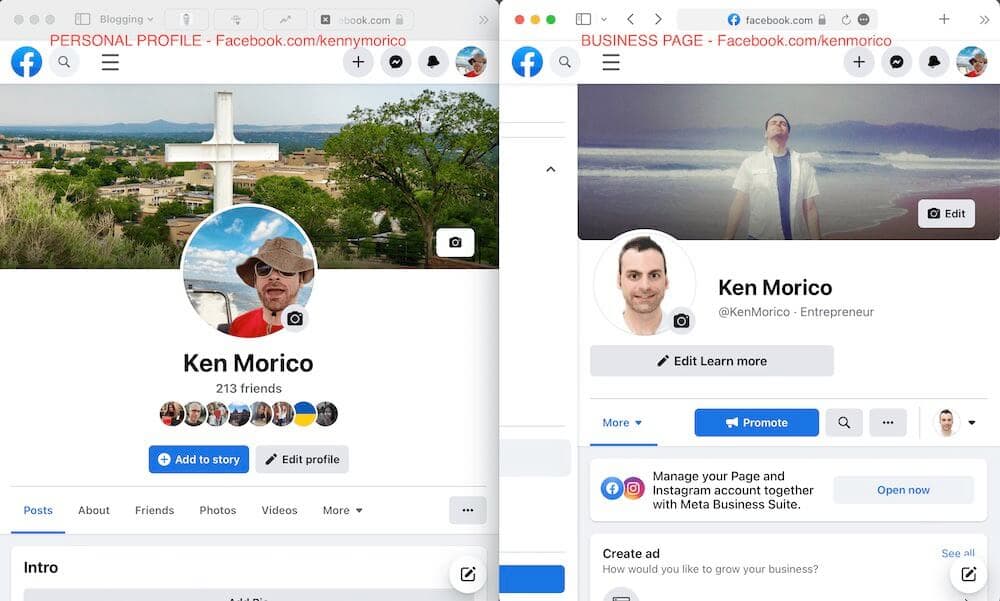
Can I have a business page without a personal profile? Pretty please?
For sure the answer in 2025 is no. HOWEVER, in July 2022 Facebook announced they tested a way for users to have up to four profiles tied to one account – one for business / work, one for friends, one for groups, etc.
The extra profiles won’t need real identities. This is great for Facebook Groups especially since Reddit is so popular based on the anonymity that the user account gives you. Personally, I love Reddit and this should be a huge boost for FB Groups and will be especially useful for business owners and marketing managers. Bookmark this post for updates.
Assuming you already set up a personal profile and business page, you might be wondering:
Can I separate my business page from my personal account on Facebook?
Facebook automatically separates your personal profile identity from public Facebook pages, but there are some gotchas. You want to be sure you are posting as the business and not confusing the status update text box with your personal status update box and vice-versa. Facebook has tools to help you do this.
Facebook says:
Business Accounts in Meta Business Suite
Meta Business Accounts make it easier to manage your Pages, Instagram accounts and the people who work on them.
Grow your business with advanced tools and insights
Securely collaborate with partners and manage their access
Separate your work and life for privacy and focus
source: business.facebook.com
Creating the Meta Business Account at business.facebook.com can enable the special admin area that will enable to visually distinguish your personal profile area from the business area.
Here’s an example of the Facebook Meta Business Suite area:
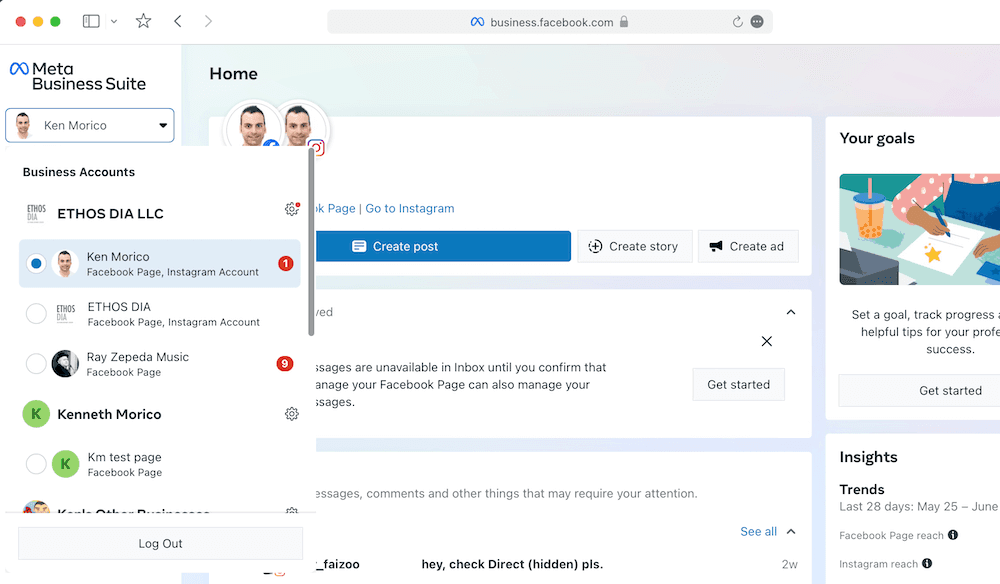
You’ll notice an organizational structure:
An LLC business with Facebook properties (pages, instagram accounts, etc.) rolled up under it. This give flexibility when working with vendors and additional people.
Here’s a tip: Facebook needs a real person to manage a business page. That person DOES NOT need to be you. You can have a social media agency or friend post to the page while you maintain control of the Facebook business assets like the Ad Account. The Meta Business Suite can enable full management of people associated with the business.
I have lots of business pages and personal accounts but I don’t know how to access them or where they are. What can I do?
As a consultant that specializes in Facebook, I can tell you I hear this question a lot. Over the years I have clients that often set up personal accounts and business pages and lose track of them and can’t find them. Also what I will demonstrate is also helpful for locating business page assets.
Here’s what you can do:
Find your current personal profile information:
Visit this page to see your current personal profile:
https://www.facebook.com/settings/?tab=account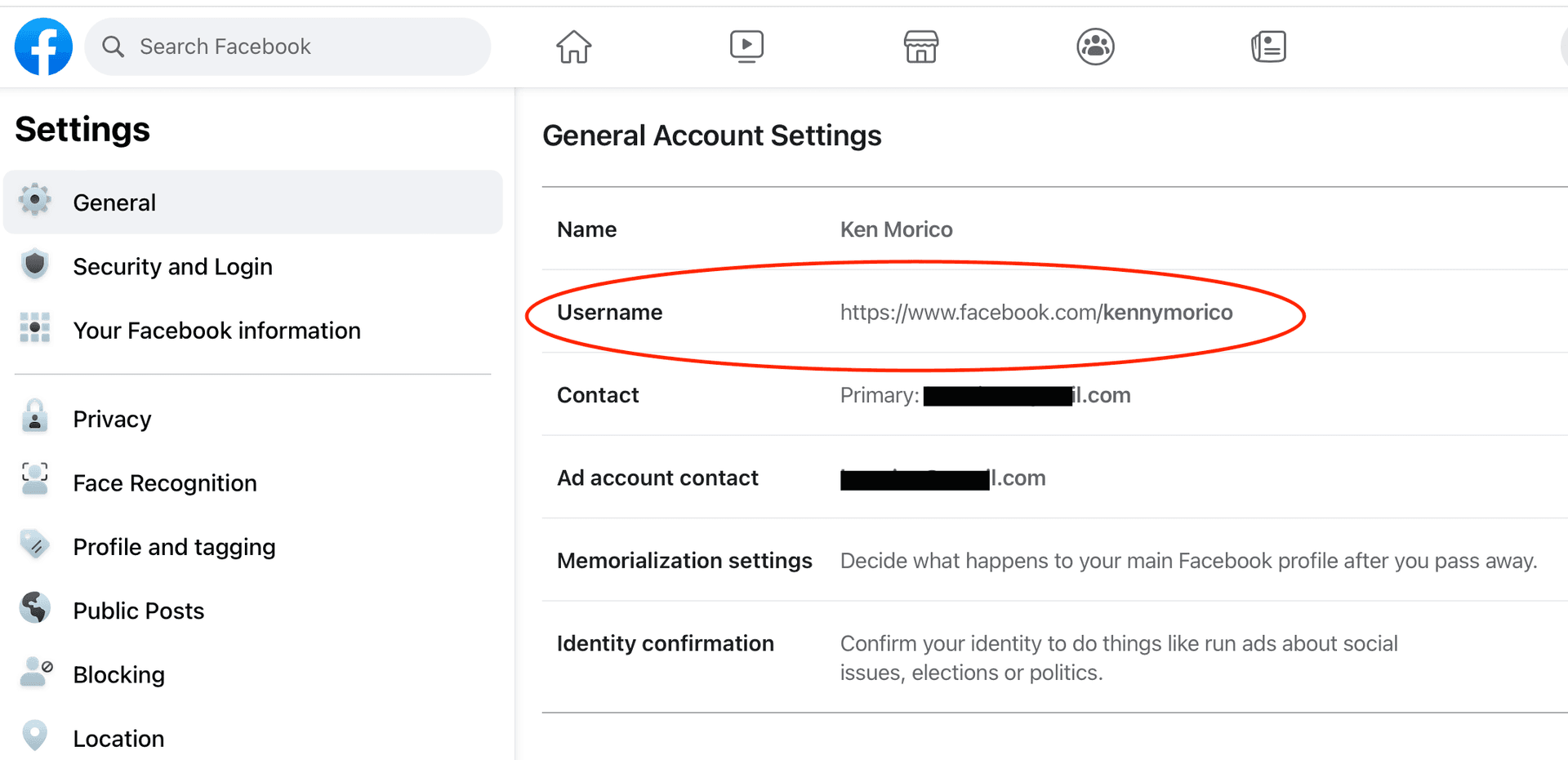
You will see your Facebook Username. This is important to differentiate between your personal and business assets because your personal username identifies you personally on the Facebook platform. You will also see the email address associated with your personal profile.
If you use your name as also a business name, like I do or some real estate agents, your Facebook name would probably be the same, but they can’t be. Usernames on Facebook are unique. What I do is I use a nickname for my personal Facebook Profile – Kennymorico. I use KenMorico for my business page.
To view all the page you manage with your currently logged-in personal profile, visit this page: https://www.facebook.com/pages/?category=your_pages
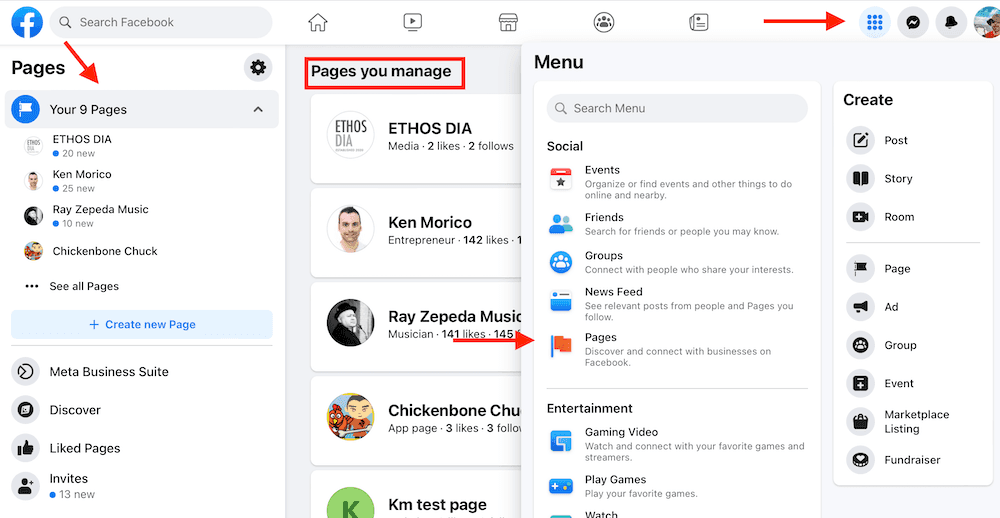
Now you can see all the pages you have access to. Once you see the page you are interested in, click it. You will see the main page. Note the @username at the top left. That is the page username. You can also see the username in the URL of the current page in your Web browser.
Once you know the username of the business page, you can now assign other people to manage the page for you or keep yourself as admin or just see the current admin status by visiting this URL, filling in your business username:
https://www.facebook.com/YOUR-BUSINESS-PAGE-USERNAME/settings/?tab=admin_roles
Facebook Business Pages Need an Authentic Person
You might be thinking, why don’t I just create a separate personal profile with another email address and phone number? You can, but you will violate Facebook terms.
Facebook is a community where people use their authentic identities. …
If you want to represent your business, organization, brand or product on Facebook, you can use your personal account to create and manage a Page. Keep in mind that a personal profile is for non-commercial use and represents an individual person.
source: facebook.com
Facebook doesn’t really have “customer service.” If your page and profile violate terms you risk losing everything you have created and NEVER getting your assets back. Too risky for me and probably you too.
To be cautious, you can download all the data for your personal profile to your local computer and you can also download all the data for your public Facebook Page.
What you can do though is pay to be verified. I've heard that can open doors to customer service.
Separate Personal and Business Facebook Video
In this video I outline how to use the Meta Business Suite App to easily separate your personal profile from your Business account.
Apps to separate Personal and Business on Facebook
- Get Meta Business Suite on iOS for iPhones
- Get Meta Business Suite on Google Play Store for Android Phones
Facebook Page / Facebook Profile - More Separation Tips
Think Facebook is just for friends? I did too until Facebook rolled out a massive structural change to Facebook Pages. Now businesses that setup “Pages” have more options to use Facebook like a regular user. How does this benefit a small business or professional person like a blogger?
With a few simple steps I’m going to outline how it’s easy to separate Facebook “friends” into two distinct groups – your personal friends with your regular Facebook profile, and business fans and people you would like your page to be a fan of. Now, Facebook pages have the ability to like other pages. This comes in handy in four ways.
- You can get other pages to notice your page when you like them.
- You can keep updated on the news feed of other pages – and not see the feed in your personal account.
- By liking other pages you are now in the group of people with similar interests.
- You can comment on other pages as a page and get people to view your profile with your business pitch or any content you want.
I’ve heard of people using Facebook to network before with their personal profile. To me, it just doesn’t make sense. I think people live in two worlds – a business world and a personal world. In my case, my name is my brand. Since my business / professional name is the same as my real name, it causes an obvious problem on Facebook. I used to think that there were better tools to use for networking like Twitter / X and LinkedIn. But these new Facebook Page capabilities make networking on Facebook easy. Plus, Facebook opens your personal brand / business to nearly a billion people.
NEW! Coaching Sessions
I offer affordable 1-on-1 coaching sessions tailored just for your needs. Facebook has constantly changed the user interface and methods to separate your business and personal matters. Get a review of your social account and solve your issues now.
HELP! I need a 1-on-1You don’t want your messages exposed to people who are not interested in receiving them. That’s why it’s important to have a separate Facebook Page. We all know people who send business-related messages on their personal accounts. Nobody likes that! If you don’t have a Facebook Page, creating one is easy.
Facebook now has a Facebook Profile Follow Button to enable anyone to subscribe to your public updates. This may make sense for a personal brand, as long as your friends don’t mind seeing your topic-specific posts. You can create filters in Facebook for your posts, but this is kind of a hassle. Separate pages can make more sense. In all, it’s not easy to separate business and personal in Facebook without some work.
The Follow button language is inline with Twitter and now LinkedIn, so users are familiar with its functionality.
Can I Convert My Personal Facebook Profile to a Facebook Business Page?
How Do I Convert My Personal Facebook Profile to a Facebook Business Page?
Yes, you can, but this isn’t a great option. If you want to convert a personal profile to a business page it’s probably because it wasn’t setup properly. Business pages are for businesses. Before Facebook Pages, many business setup personal profiles for their businesses because that was the only option available to them. Now, you can convert the personal profile to a business page, but would your personal friends appreciate it? Do you want to lose your personal friends? I suggest creating a new, separate Facebook Page and let your friends know about it by posts in your personal feed and through page invitations.
Here is the official word from Facebook:
When you convert your personal account to a Facebook Page, a business account will be created to manage your Page. We’ll transfer your current profile picture and add all your friends and followers as people who like your Page. Your account’s username will become the username for your Page, and the name associated with your personal account will become your Page’s name. If you want your Page to have a different name, consider creating a new one.
No other content will be carried over to your new Page, so be sure to save any important content before beginning the conversion
source: facebook.com
What Benefits / Features do Facebook Pages Have Versus Facebook Profiles?
Facebook business pages are more capable than personal profiles. Useful Page features:
- Tabs
- Advertising
- Like boxes
- Multiple administrators
- Categories – useful for the powerful Graph Search Facebook introduced
- Instant followers – no one needs to accept the fan / follower request
- Facebook Insights (analytics) – get useful information about your audience and posts. Personal profiles have NO analytics.
- Peace of mind – know that with a page everything you post will be public – no need to worry about privacy or audience like with a personal profile
Like me, many people have a personal brand. I created a Facebook business page that included my real name. So, for example “Ken Morico.” I keep my personal account private using privacy settings so my business page doesn’t compete with my personal profile. It helps me separate my family and my professional contacts on Facebook and helps me target my status updates. Review your personal account privacy settings here: https://www.facebook.com/settings?tab=privacy
Here’s what Facebook analytics look like:
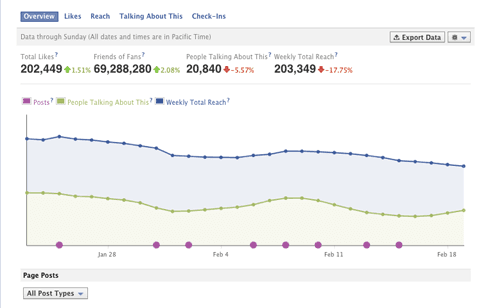
I Want To Convert My Facebook Profile To A Facebook Page. What Do I Lose / Need To Watch Out For?
Some people report that you lose the ability to comment in Facebook Groups once you convert your Facebook Profile to a Facebook Page. If you want to participate in groups, you can instead comment as your page on the walls of other pages and get conversations going that way. Also, Reddit and LinkedIn have strong communities and groups, so you may want to check out those as well.
When you convert your personal profile your friends will become your fans/followers. Do they want to? My guess is no. Be careful.
I am a Consultant / Advertising Agency, How Can I Manage Many Facebook Business Accounts?
When I worked for an agency, I setup a new, dummy Facebook profile to connect all the Facebook Pages to that separate account. It’s a good way to fully separate many business accounts from your own personal account. You might name that separate Facebook profile “Ken at Work” or make up a name. Then you can create pages using that account. For most small business users and entrepreneurs with only a few pages, I would recommend just using your own personal Facebook profile to connect your pages plus you won’t violate Facebook’s community guidelines like I mentioned earlier.
Manage Accounts with HootSuite
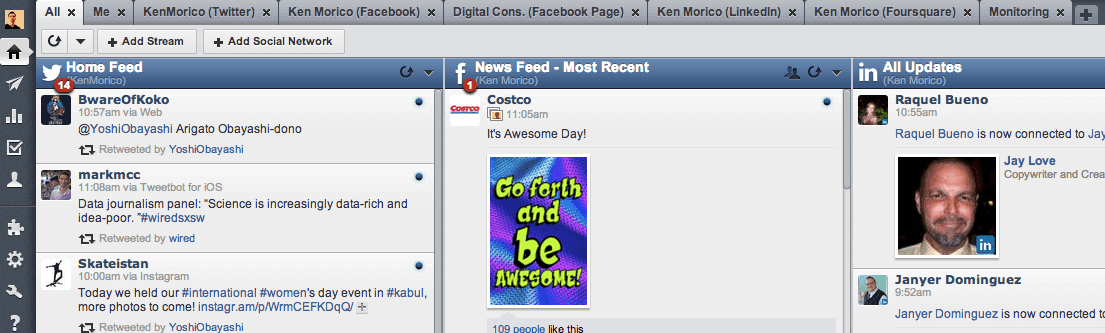
HootSuite can help you manage your social media accounts and help you separate your personal and professional social media lives. Basically, it uses tabs for each stream in a social media account. You can create custom tabs, for instance called “Personal” and “Professional” and keep track of feeds and special search feeds. For instance, I have a tab called “Monitoring” where I keep up to date on what people are saying in the blogging world, allowing me to enter the conversation at any time. With HootSuite’s posting abilities, you can choose which accounts you want to post from and schedule them in the future. Very handy. I’ve found monitoring works better with Twitter than Facebook primarily because I think people are better with using hashtags on Twitter.
I also created a “Me” tab where I gather mentions and searches for my name so I can monitor my personal brand. I suggest you do the same.
Updates
Facebook is constantly changing the user interface and methods for separating business and personal. I’ll be posting more articles on Facebook strategies and learnings as I go, so please subscribe to my newsletter to stay notified and schedule a Facebook consulting session with me to help with recent changes. Also, I periodically update this page with new information, so bookmark it for reference.